International IPTV Channels: Filter by Country in Maximus
If your watchlist spans more than one country, one giant unsorted channel list gets old fast. Maybe you moved abroad and still want the evening news from home, your household follows two or three national football leagues, or your provider handed you a playlist with channels from a dozen countries. Maximus IPTV Player groups live channels by country, so you can jump straight to one region's lineup instead of scrolling past everything else. This guide covers how country filters work, how to get international channels into the app, and how the TV guide, subtitles and Favorites make a multi-country library easy to live with.
A quick note before we start: Maximus is a player, not a content provider. It doesn't sell or bundle channels. Everything below assumes you bring your own legal IPTV subscription.
Key Takeaways
- Maximus IPTV Player groups Live TV channels by country, with country filters that narrow the list to one region at a time.
- The countries you see come from your own sources and how they label channels, not from a fixed menu.
- You can add sources with an Xtream Codes login or an M3U/M3U8 playlist, and combine several sources into one library.
- The TV guide's Sports, Movies, Kids and Favorites filters, plus subtitle and audio track selection, make foreign lineups much easier to use.
- The same country-grouped library works on iPhone, iPad, Android phones, tablets and Android TV.
Why Do International IPTV Libraries Need Country Filters?
IPTV (Internet Protocol Television, meaning TV delivered over the internet instead of cable or satellite) rarely comes as one tidy lineup. Combine a couple of sources and you can easily end up with thousands of channels. Without organization, that's a long alphabetical scroll where similarly named stations from different countries get mixed together, and "Sport 1" could belong to any of several broadcasters.
Country filters matter most for three kinds of viewers:
- Expats and international students who want news, sports and shows from home.
- Multicultural households where different family members follow different national broadcasters.
- Anyone combining sources, such as a UK-focused subscription and a separate Turkish-language one, who needs a way to tell the lineups apart.
How Do Country Filters Work in Maximus IPTV Player?
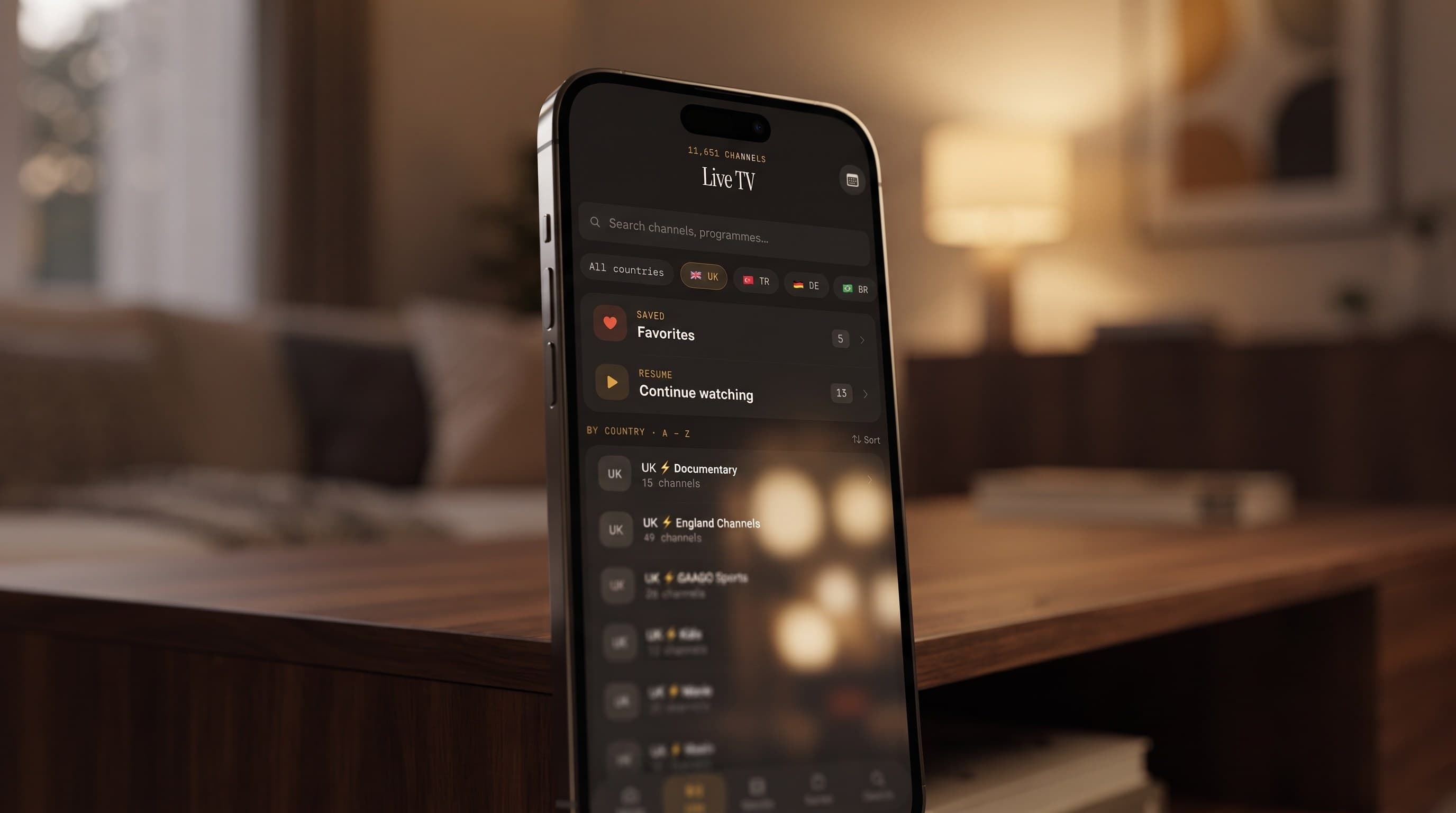
Open Live TV and, instead of one undifferentiated list, you'll find channels grouped by country with filters to switch between them. Tap a country and the list narrows to that region's lineup; pick another to pivot. It's a quick way to move between "what's on in the UK" and "what's on in Brazil" without leaving Live TV.

The groups reflect your own library. If your source labels channels by country, Maximus sorts them for you, so a playlist mixing UK, Turkish, German and Brazilian channels shows up as separate groups instead of one mixed list. The cleaner your provider's channel labels, the cleaner the grouping.
Two other tools sit on top of the country groups:
- Favorites: star the handful of channels you watch every day, such as a home-country news channel and a couple of sports feeds. Favorites work as a cross-country shortlist, regardless of which group each channel came from.
- Continue Watching: shows and movies you've started stay easy to pick up, which helps when you're following series in more than one language.
For a broader look at managing a big lineup, see how to organize thousands of IPTV channels.
How Do You Add International Channels to Maximus?
Country filters only help if your library actually contains international content, and that comes down to sources. Maximus IPTV Player supports two source types on both iOS and Android:
- Xtream Codes: a login-based connection. You enter the server address, username and password from your provider, and the app pulls in live channels, movies and series.
- M3U or M3U8 playlist: a plain-text file or link listing channel names and stream addresses. M3U8 is the UTF-8 version, which matters for international libraries because it displays Turkish, Arabic, Greek or Cyrillic channel names correctly.
On iPhone and iPad you can also add a source by scanning a QR code or importing a file, which saves typing long playlist links on a phone keyboard.
You can add more than one source, and Maximus combines them into one library. Someone with a UK provider and a separate Turkish-language subscription can add both and get country groups spanning both, rather than juggling two apps. On Android, multiple sources are part of the optional Premium subscription, which includes a 7-day free trial on the monthly and annual plans. The guide to multiple IPTV sources in one app covers setup in detail.
How Does the TV Guide Help With Foreign Schedules?
Unfamiliar broadcasters are harder to browse because you don't know their schedules by heart. That's where the EPG (Electronic Program Guide, the on-screen TV schedule) earns its place. Maximus shows a real timeline: channels down the side, time across, programs laid out as blocks. You can see what's airing on a UK sports channel and a Brazilian channel without jumping between streams.
The guide's filters stack nicely with international viewing:
- Sports: check which matches are on across countries, where broadcast rights often differ.
- Movies: find films airing tonight, whatever the language.
- Kids: children's channels only, handy for bilingual families.
- Favorites: your cross-country shortlist in timeline form.
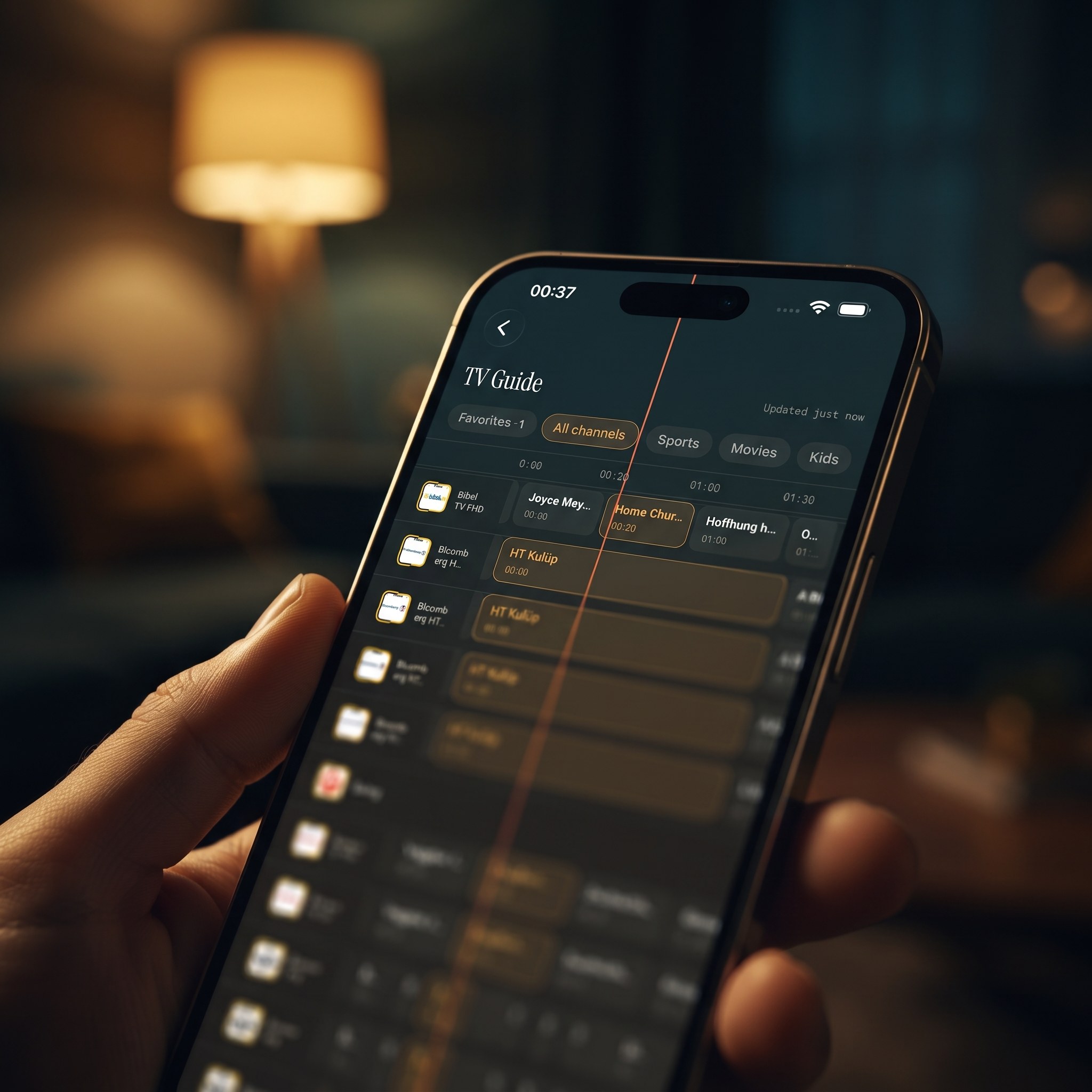
Guide data comes from your provider, so a channel only shows listings if its source supplies them. If every program on a foreign channel looks shifted by a few hours, the time offset in the provider's guide data is the usual cause. Learn more in how the TV guide actually works.
Can You Watch in Your Own Language?
International viewing often means content in a language that isn't everyone's first. Maximus lets you pick subtitle and audio tracks during playback, so when a source includes a second audio language or subtitle track, you can switch to it. What's available depends on the stream itself; many live channels carry a single audio track, while movies and series more often include options.
Universal search helps too. Type a channel or title and Maximus searches live channels, movies and series together, which beats scrolling a foreign country group when you already know what you're looking for.
Can You Watch Home-Country Channels While Living Abroad?
This is the most common reason people look for an app like this. As long as your source works from the network you're connecting through, Maximus plays it the same way it would at home.
Two practical notes:
- Providers can restrict access by region. Some providers geo-block their own streams whatever player you use. If a channel refuses to load abroad, check with your provider first.
- A VPN is a networking tool, not a fix for licensing. A VPN (Virtual Private Network) routes your connection through an encrypted tunnel to a server elsewhere. Some people use one for privacy on unfamiliar networks, but it doesn't change what your subscription covers. Check your provider's terms and local rules before relying on one.
If you're on the move rather than living abroad, the guide to traveling with IPTV covers hotel Wi-Fi, downloads and room TVs.
Does It Work the Same on iPhone, iPad and Android?
The country-grouped library, TV guide, search, Favorites and track selection work on both platforms. The differences are in devices and big-screen viewing:
- iPhone and iPad: the App Store app, which also runs on Macs with Apple M1 or later and on Apple Vision. iCloud syncs playback progress between your iPhone and iPad. You can cast to a TV with AirPlay (Apple's wireless streaming system) or Chromecast (Google's casting system for TVs and streaming sticks).
- Android phones and tablets: the Google Play app, with Picture-in-Picture and background playback. The Android app doesn't cast to TVs.
- Android TV and Google TV: the same Google Play listing, with a native interface built for the remote, so international channels play directly on the TV.
- Apple TV: no dedicated app; you reach it with AirPlay from an iPhone or iPad.
Progress doesn't sync between iOS and Android, so a household using both platforms should set up each device separately.
Do Parental Controls Cover Every Country?
Yes. A multi-country library can mix family channels with adult content from several providers, so it helps that the parental lock hides adult content behind a PIN across your library rather than per country. On iPhone and iPad you can also unlock with Face ID, and on Android the lock re-arms automatically after you use it. On Android, the parental lock is part of Premium.
FAQ
Does Maximus IPTV Player come with international channels?
No. Maximus is a player app. It organizes and plays channels from your own legal subscription or playlist. Country groups sort whatever you add; they don't come with content.
Why don't I see a filter for my country?
The groups come from how your source labels its channels. If channels from a country aren't tagged with that country, they won't form a group. Your provider controls those labels, so ask them if something looks wrong.
Can I combine a UK playlist and a Turkish playlist in one library?
Yes. Add both as sources and Maximus combines them into one library, grouped by country, so the lineups stay easy to tell apart.
Will international channels show up in the TV guide?
If your provider supplies guide data for them, yes. The guide works the same way for every source in your library.
Does country filtering work offline?
Live channels need an internet connection. For flights or patchy connections, Maximus can download movies and series episodes for offline viewing.
Is watching international channels legal?
That depends on your subscription. Maximus is a player that doesn't provide or endorse any content, so only connect sources you're licensed to use.
Bring Your Channels From Home Into One Library
If your viewing spans several countries, country groups, Favorites and the TV guide's filters turn a sprawling lineup into something you can actually browse. Spend a few minutes starring your everyday channels and you'll rarely need to scroll the full list again.
Maximus IPTV Player is free to download, with an optional Premium subscription. Get it on the App Store for iPhone, iPad and Apple silicon Macs, or on Google Play for Android phones, tablets and Android TV.
Written by
Maximus IPTV Team