IPTV Player with EPG: How the TV Guide Actually Works
You open your IPTV app, scroll past a wall of channel names, and 200 channels later you still have no idea what's actually on. An IPTV player with EPG fixes that. An EPG, or Electronic Program Guide, is the on-screen TV schedule that shows what's airing now, what's next and what's coming later tonight. Maximus IPTV Player builds its TV Guide around exactly that job on iPhone, iPad, Android phones and tablets, and Android TV. This guide explains where guide data comes from, how the TV Guide in Maximus is organized, and what to do when the guide shows channels but no programs.
Key Takeaways
- An EPG is a time-based grid of programs for each channel, the same idea as a cable box guide, adapted for internet TV.
- Guide data comes from your IPTV provider, not from the player. Xtream Codes logins usually include it, and M3U playlists link to it through channel IDs and an XMLTV guide address.
- Maximus IPTV Player shows a real timeline guide with Sports, Movies, Kids and Favorites filters on both iOS and Android.
- Most "empty guide" problems trace back to the source: missing guide data, mismatched channel IDs or a time zone offset.
- Maximus is a player only. You bring your own legal IPTV subscription, and the guide organizes the channels you already have.
What Is an EPG in IPTV, Exactly?
If you've ever used a cable or satellite box, you already know the concept: the grid that tells you a sitcom starts on one channel at 7:00 PM and the big match kicks off on another at 8:00 PM. IPTV (Internet Protocol Television, meaning TV channels delivered over an internet connection instead of cable or satellite) needs the same thing. The difference is that the schedule doesn't come down a cable. It comes from data files your provider publishes.
A few terms make the rest of this guide easier to follow:
- M3U / M3U8: plain-text playlist files that list channel names next to their stream addresses. M3U8 is the UTF-8 version, which handles non-Latin channel names cleanly; the same extension is also used for HLS stream playlists.
- Xtream Codes: a login-based way to connect to a provider. Instead of a playlist file, you enter a server address, username and password, and the app pulls in live channels, movies, series and usually the guide.
- XMLTV: the standard format for guide data. For every program it lists the channel, title, description, start time, end time and often a category.
- HLS (HTTP Live Streaming): Apple's adaptive streaming protocol. It splits video into short chunks so the player can shift quality as your connection changes, which is why most modern IPTV streams use it.
Here's the key point: without an EPG, an IPTV app is just a channel launcher. You see names like "SPORTS 01 HD" with zero context. With an EPG, the same app becomes a TV guide you can actually plan an evening around.
Where Does EPG Data Come From?
The player doesn't invent the schedule. It reads whatever your source provides, and how that data arrives depends on the type of source you added:
- Xtream Codes login: the provider's server exposes the guide alongside the channel list, so in most cases the schedule arrives automatically once you sign in. This is the simplest route if your provider offers it.
- M3U or M3U8 playlist: each channel entry can carry a channel ID (the tvg-id attribute), and the playlist may point to an XMLTV guide file. The player matches each channel's ID to the matching entries in the guide. When the IDs line up, programs appear; when they don't, you get channels with empty rows.
How far ahead you can scroll also depends on the provider. Some publish a day of listings, others several days. If your guide stops after tonight, that's the length of the feed, not a limit in the app.
How Does the TV Guide Work in Maximus IPTV Player?
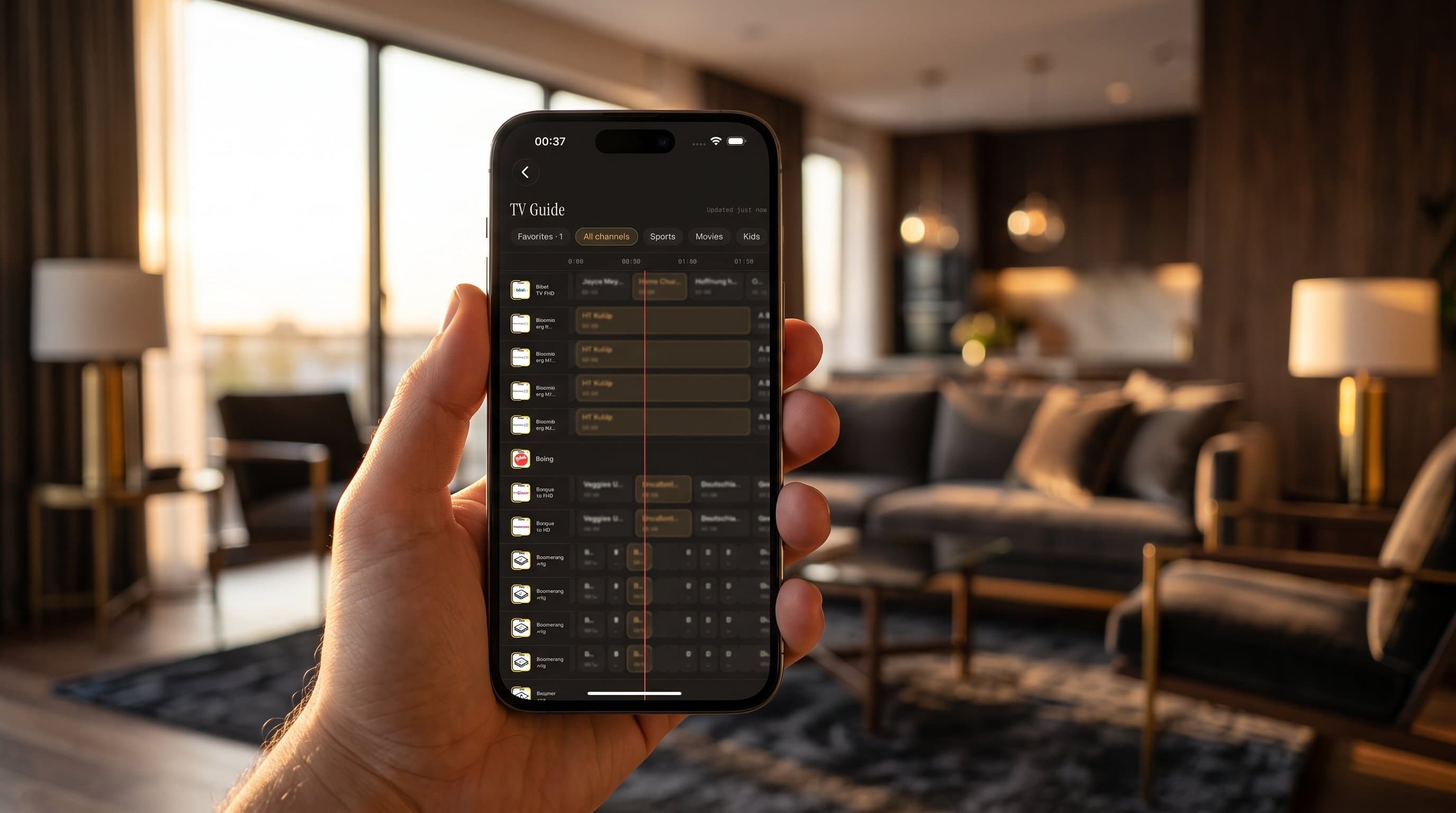
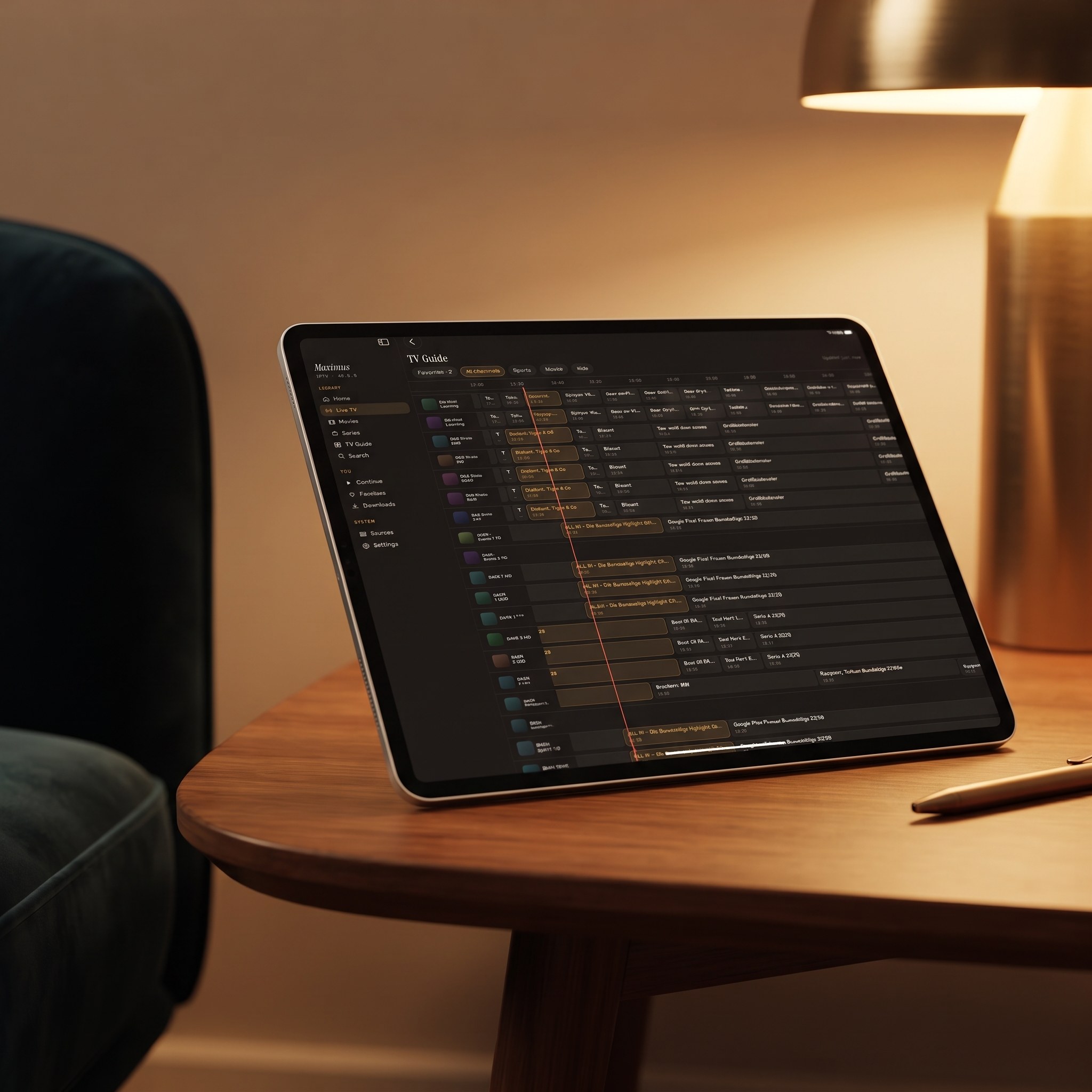
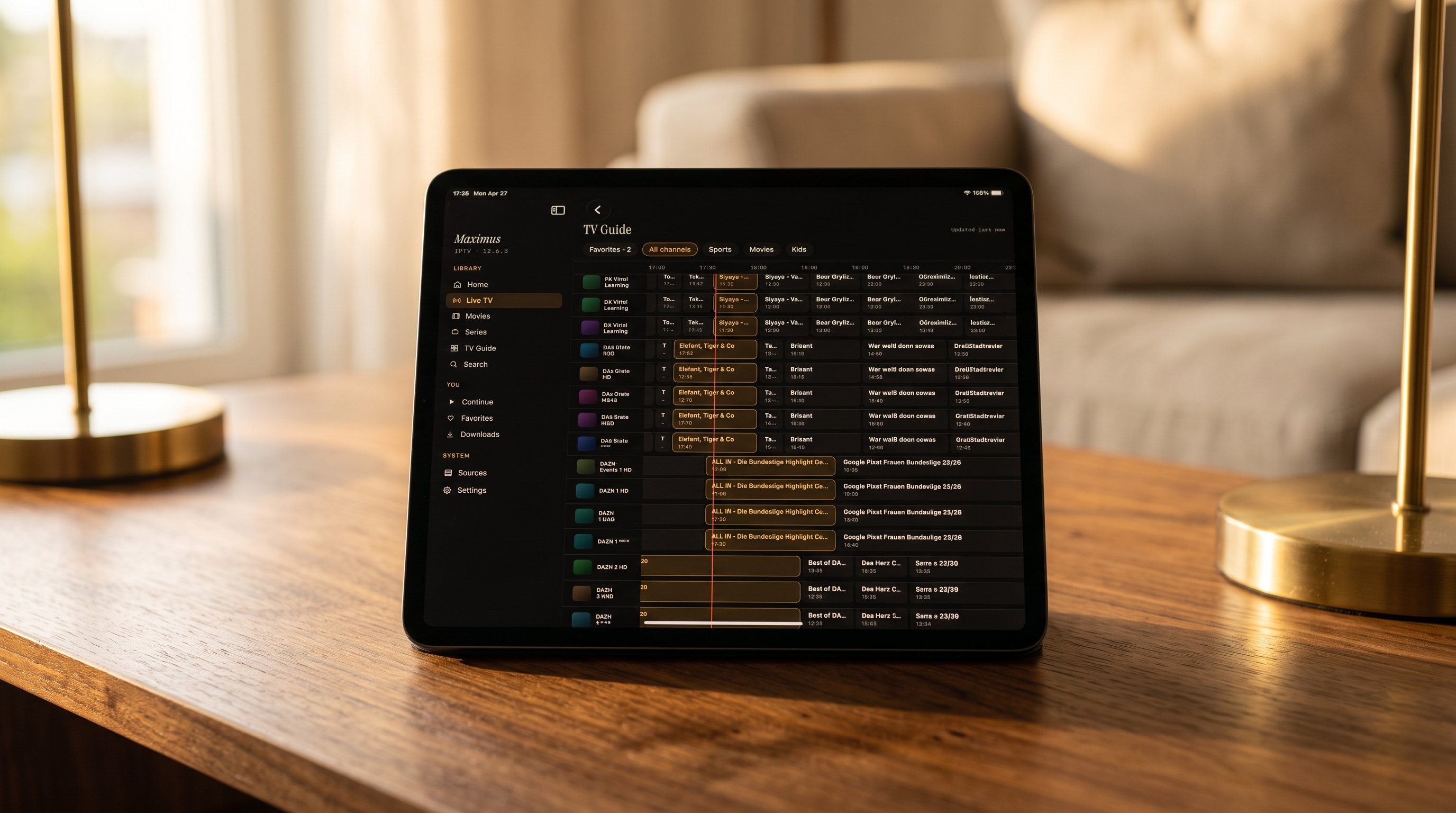
Open the TV Guide in Maximus IPTV Player and you get a real timeline rather than a text list: channels run down the side, time runs across, and each program is a block sized to its runtime. Programs crossing the current time are on right now; everything to the right is coming up. Scroll ahead to see what starts later, then jump into a channel when something catches your eye.
The guide doesn't live on its own. It sits alongside the rest of the app's organization tools:
- Live TV grouped by country, with country filters, so a multi-country library doesn't blur together.
- Universal search across live channels, movies and series when you already know the name of what you want.
- Favorites and Continue Watching, so your regular channels and half-finished shows stay one tap away.
- Multiple sources combined into one library, so the guide covers everything you've added rather than one provider at a time.
For more on taming a very large lineup, see how to organize thousands of IPTV channels.
How Do the Sports, Movies, Kids and Favorites Filters Help?
A full guide with hundreds of channels is still a lot to scan. The filters narrow the timeline to the slice you care about, without leaving the guide:
- Favorites: only the channels you've starred. This is the fastest way to check "what's on my usual channels" at a glance. Star your regulars first, because an empty Favorites list defeats the point.
- Sports: sports channels only, which makes checking kickoff times across leagues much quicker than hunting channel by channel. If you follow live sports closely, the IPTV setup guide for sports fans goes deeper.
- Movies: film-focused channels, handy on a night when you want something to put on rather than a specific title.
- Kids: children's channels, useful when you hand a tablet to a child.
How neatly channels land in each filter depends partly on how your provider names and groups them. If a filter looks thin, check the full channel list before assuming something is missing.
One important distinction: the Kids filter is a convenience view, not an access control. Maximus has a separate parental lock that hides adult content behind a PIN. On iPhone and iPad you can also unlock with Face ID, and on Android the lock re-arms automatically. The IPTV parental controls guide explains how it works.
Why Does an EPG Change the Way You Watch?
The difference between IPTV with and without a guide is the difference between flipping aimlessly and knowing what you want to watch.
- Now and next at a glance. Instead of opening stream after stream, you scan the grid, spot something, and tap straight in.
- Plan ahead. Scroll forward to see what's on at 9:00 PM across your movie channels, or which channel carries tomorrow's early match.
- Less time lost to big libraries. Once you combine a couple of sources, a lineup can run into the thousands. A filtered guide turns that into a short, readable list.
- Better context before you commit. A program title and description tell you whether a channel is worth switching to, and whether you've already missed most of the show.
Does the Guide Work the Same on iPhone, iPad and Android?
The same guide concept, with the same filters, runs on both platforms:
- iPhone: a focused view suited to a smaller screen.
- iPad: the larger display gives the timeline more room, so you see more channels and more hours at once. The iPad app also runs on Macs with Apple M1 or later and on Apple Vision.
- Android phones and tablets: the same guide from the Google Play app. On Android, the full TV guide is part of the optional Premium subscription, and the monthly and annual plans come with a 7-day free trial.
- Android TV and Google TV: a native interface designed for the remote, so the guide works from the couch.
There's no Apple TV app. To watch on an Apple TV, find the program on your iPhone or iPad and send it over with AirPlay, Apple's wireless streaming system. From iPhone and iPad you can also use Chromecast, Google's casting system for TVs and streaming sticks. The Android app doesn't cast, but Android TV runs Maximus natively, and Android phones and tablets support Picture-in-Picture and background playback. Subtitle and audio track selection work the same way whether you found a channel through the guide or through search.
What If the EPG Is Empty or Shows the Wrong Times?
A guide with no program titles, or times that don't match reality, almost always points to the source rather than the app. Work through these checks:
- Confirm your provider supplies guide data. Some playlists include only channel streams. Ask the provider whether an EPG is included, or whether they offer an Xtream Codes login, which usually carries the guide automatically.
- Check channel IDs in M3U playlists. If channels appear but their rows are empty, the playlist's channel IDs probably don't match the IDs in the XMLTV file. Only the provider can fix that mapping.
- Look at time zones. If every program is shifted by the same number of hours, the guide data's time offset or your device's time zone setting is the usual culprit. Make sure your device sets its time zone automatically.
- Give a new source a moment. Large sources with thousands of channels can take a little while to load their full schedule.
- Refresh the source. Guide data changes daily, so refreshing pulls in the latest listings. On Android, source refresh is included with Premium.
If channels themselves won't load, the problem is bigger than the guide. The troubleshooting guide for when your IPTV playlist is not working covers that.
FAQ
Do I need an EPG to watch IPTV?
No. You can pick channels straight from the list without a guide. But you won't know what's on now, what's coming up, or whether the movie on channel 302 started ten minutes ago or an hour ago. An EPG turns blind browsing into an informed choice.
Does browsing the guide use much data?
Very little. Guide data is text: titles, times and descriptions. Data use only climbs once you start playing a stream, especially in HD or 4K.
Can I use the TV Guide on Apple TV?
Maximus isn't available as an Apple TV app. Browse the guide on your iPhone or iPad, start the channel, and AirPlay it to your Apple TV. On Android TV and Google TV, the app runs natively with the guide built in.
Is the Kids filter the same as parental controls?
No. The Kids filter narrows the guide to children's channels. The parental lock is the actual restriction: it hides adult content behind a PIN across the app.
What if my provider doesn't give me guide data?
Ask them. Many providers include an EPG but don't advertise it, and switching from a bare playlist to an Xtream Codes login from the same provider often brings the guide with it. The player can only display the schedule its source provides.
Is using an EPG legal?
Yes. An EPG is schedule information: program titles, air times and descriptions. Showing it in a player is no different from a cable box showing its guide. Maximus is a player app only, and all content comes from your own legal subscription.
Stop Channel-Surfing in the Dark
An EPG sounds like a small feature on paper, but it changes how you use an IPTV app. It turns a flat channel list into a schedule you can scan, filter and plan around, and once you're used to it, a bare channel list feels like a step backward.
Maximus IPTV Player is free to download, with an optional Premium subscription. Get it on the App Store for iPhone, iPad and Apple silicon Macs, or on Google Play for Android phones, tablets and Android TV, then add your own source and give your channel list the guide it deserves.
Written by
Maximus IPTV Team