IPTV Login Failed? Fix Xtream Username and Password Errors
You typed your Xtream Codes details into a new app, tapped Add, and got "login failed," "authentication failed," or a blank list. Nothing is more annoying, because the same details worked yesterday or in another app. The good news: in most cases the cause is small and fixable in a few minutes. This guide walks through every common reason an IPTV login fails and how to check each one in Maximus IPTV Player, the free-to-download IPTV player for iPhone, iPad, and Android.
One important note before we start: Maximus IPTV Player is a player. It does not provide channels, playlists, or accounts. You bring the login from your own legal IPTV subscription, and the app connects to it. That also means that when a login fails, the answer is almost always in the details your provider gave you, not in the app.
Key Takeaways
- An Xtream Codes login has three parts: a server address (URL with a port), a username, and a password. A mistake in any one of them looks like the same "login failed" message.
- The most common causes are typos, hidden spaces from copy-paste, a missing port number, and an expired subscription.
- Many providers cap the number of simultaneous connections (often 1 to 3 devices). A login can fail simply because another device is already using the slot.
- If one login fails, test it again in a browser or a second device before changing anything else.
- Maximus IPTV Player supports both Xtream Codes logins and M3U/M3U8 playlists on iOS and Android, so you can fall back to the other format if your provider offers both.
What is an Xtream Codes login, exactly?
Xtream Codes is a widely used API (application programming interface, a standard way for two programs to talk to each other) that IPTV providers use to hand a player its channel list, movies, and series. Instead of a single playlist file, you give the player three values:
- Server URL — for example
http://example-provider.com:8080. The number after the colon is the port. - Username — a string from your provider, often random letters and digits.
- Password — also from your provider, and case-sensitive.
The player sends these to the server, and the server answers with an account status and your content. If any value is wrong, the server refuses, and the app can only tell you the login failed. If you want the full picture of what your player requests, our guide to the Xtream Codes API explains the calls in plain language.
Why does my IPTV login fail? Start with the boring causes
Roughly nine out of ten failed logins come from this short list. Work through it top to bottom before anything exotic.
A quick first test: enter the three values in our free Xtream Codes checker. If it says the login works, your details are right, and the problem is how they were typed into the app or a busy connection slot. If it says the login was rejected, fix the details first. It also shows whether the subscription has expired.
Is there a typo or a hidden space?
Credentials are usually long, and characters like capital I, lowercase l, the number 1, capital O, and the number 0 look nearly identical on a phone screen. The sneakiest problem is a trailing space: when you copy a username from an email or chat, the selection often grabs an invisible space at the end. The server sees "myuser " and "myuser" as different names.
How to check: paste the value into a plain notes app, look for a space at the end, delete it, and copy again. Better still, type the value by hand once, slowly, and compare. On iPhone and iPad, Maximus IPTV Player can also add a source by QR code or file, which removes typing entirely if your provider supplies one.
Is the server URL complete?
The server address needs the right scheme (http:// or https://) and usually a port. Leaving off the port, or adding a stray slash and a path like /get.php, can break an otherwise correct login. Use exactly the base address your provider gave you, and nothing else. If your provider listed both an http and an https address, try the other one when the first fails.
Is your subscription still active?
An expired or paused subscription often fails with the same message as a wrong password. Check the date in your provider's customer area, or email their support. If you renewed recently, ask whether the credentials changed. Some providers issue new ones on renewal.
Is the password case-sensitive and correct?
Passwords are case-sensitive. A password that begins with a capital letter on your desktop may have been auto-lowercased by a phone keyboard. Turn off auto-capitalization if you are retyping, and watch for the keyboard replacing straight quotes or dashes with curly versions.
Can too many devices cause a login failure?
Yes, and this one surprises people. Many IPTV subscriptions allow a limited number of simultaneous connections, commonly between 1 and 3. If your account is already streaming on a TV, a tablet, and a phone, a fourth login can be refused even though every character is correct.
Test it: close the app on every other device (or wait a couple of minutes for the old session to time out), then try again. If it works, you have found the cause. Your options are to ask your provider about adding a connection or to stop using one device at a time.
What about network and region problems?
If the credentials are right and the subscription is active, look at the path between your device and the server.
- Wi-Fi versus mobile data. Switch one for the other and retry. If it works on mobile data but not on your home Wi-Fi, your router or internet provider may be blocking the server. Restarting the router is a cheap first test.
- VPN (virtual private network). A VPN routes your traffic through another server. Some IPTV servers refuse connections from certain VPN addresses, and some only work with one. Turn the VPN off for the test, then back on to compare.
- Provider-side blocks. Some internet providers throttle or block certain ports. Ask your IPTV provider whether they offer an alternate port or an https address.
- Date and time. Rarely, a device with a wrong clock fails secure (https) connections. Set date and time to automatic.
A quick sanity check: type the server URL into your phone's browser. If the page never loads at all, the problem is the network or the server, not your username.
How do I add the source in Maximus IPTV Player?
Once you have verified your details, the setup takes about a minute:
- Open Maximus IPTV Player and go to the Sources screen.
- Choose Add a source, then pick the Xtream Codes login option.
- Enter the server URL, username, and password exactly as provided, with no trailing spaces.
- Save and wait for the library to load. A large library can take a little while the first time, so give it a moment before assuming something is wrong.
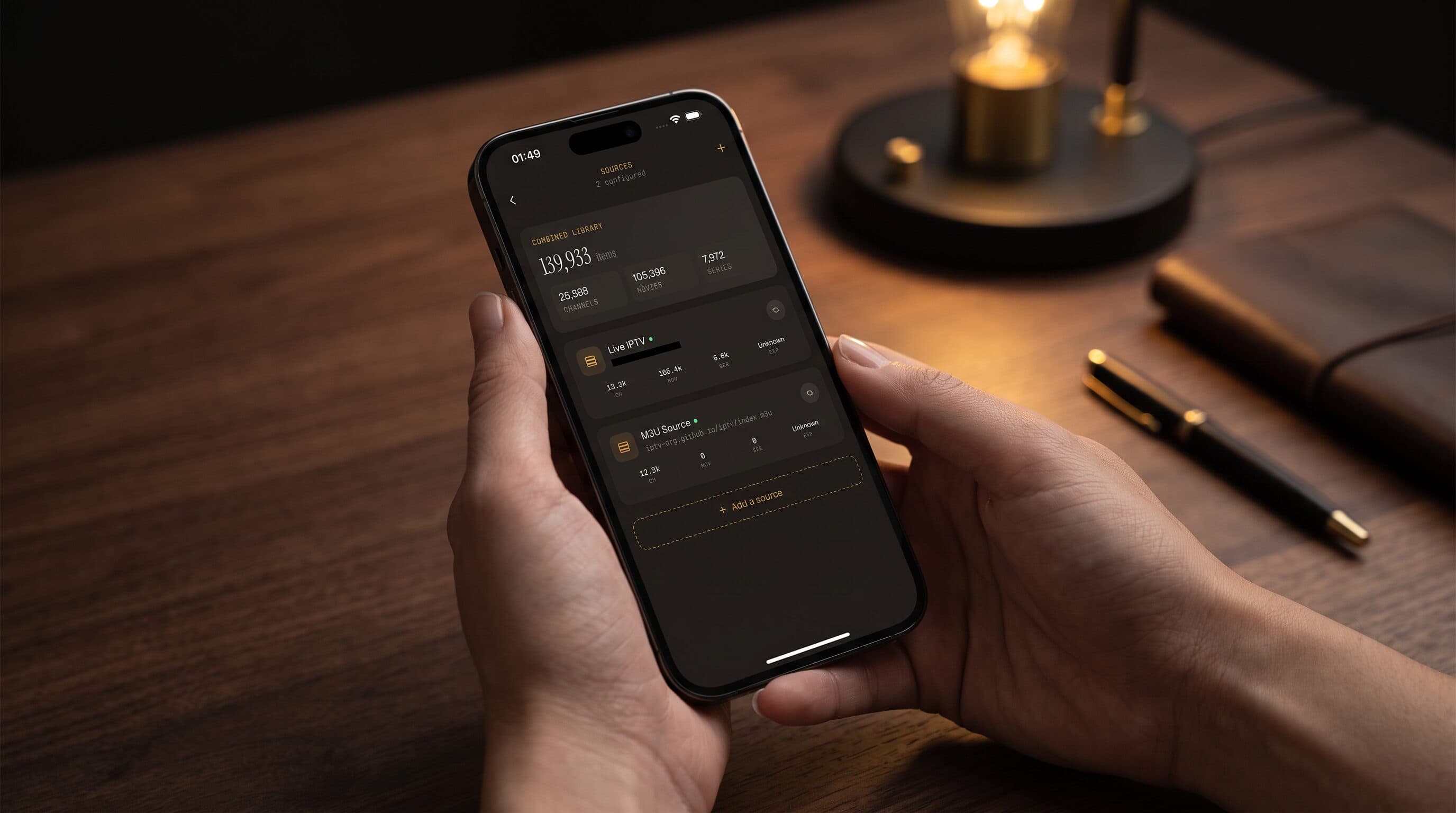
The Sources screen shows each connected source with its channel, movie, and series counts. In a typical setup, a healthy source reports thousands of channels at once, so a source that shows zero items usually means the login worked but the provider returned nothing, which is a different problem from a refused login. If a source ever shows an unexpected zero, remove it and re-add it with fresh details. For the full walkthrough on iPhone, see adding an Xtream Codes login on iPhone.
Your credentials stay on the device. Maximus IPTV Player has no ads and no tracking, and the login is sent only to the server address you typed.
Should I try an M3U playlist instead?
Many providers offer the same subscription as an M3U playlist link as well as an Xtream login. M3U is a plain-text playlist format, and M3U8 is its UTF-8 encoded variant, which many players use for HLS (HTTP Live Streaming, the technique that delivers video in small chunks). Both work in Maximus IPTV Player on iPhone, iPad, and Android.
If the Xtream login keeps failing and your provider supplies an M3U link, add that instead. One catch: an M3U link usually embeds your username and password in the URL, so treat it like a password and never post it publicly. If the playlist link itself will not load, our guide to fixing a playlist that is not working covers that side. You can also read how Xtream, M3U, and M3U8 differ before deciding which to use.
A short checklist you can follow in five minutes
- Retype the username and password by hand (no copy-paste).
- Confirm the server URL includes the port and the right http or https.
- Check that the subscription has not expired.
- Close the app on all other devices to free a connection slot.
- Switch between Wi-Fi and mobile data, and test with the VPN off.
- Try the M3U link if your provider offers one.
- Contact your provider with the exact error and the time you saw it.
That last step matters more than it sounds. Providers can see server-side logs and often tell you in one message whether your account was blocked, expired, or over its connection limit.
Frequently Asked Questions
Why does my login work in one app but not in Maximus IPTV Player?
Usually because the details were entered slightly differently, for example with a missing port or a trailing space, or because the other app is the one currently holding your connection slot. Retype the values and close the other app, then try again.
Does Maximus IPTV Player give me a username and password?
No. Maximus IPTV Player is a player app, not a content provider. Your credentials come from your own legal IPTV subscription.
The login works but the list is empty. What now?
The server accepted you but returned no content. Check with your provider that the subscription includes live TV, movies, or series, then remove and re-add the source.
Is it safe to type my IPTV password into the app?
Credentials stay on your device, and the app shows no ads and does not track you. Still, only enter them for a provider you trust.
Can I use more than one source at once?
Yes. Maximus IPTV Player can combine multiple sources in one library, for example an Xtream login plus an M3U playlist. Multiple sources are a Premium feature on Android.
Get connected
A failed IPTV login feels final, but it is almost always one of a handful of fixable things: a typo, a missing port, an expired plan, or a busy connection slot. Work through the checklist, and you will usually be watching again in minutes.
Ready to try it? Download Maximus IPTV Player on the Apple App Store for iPhone and iPad, or on Google Play for Android phones, tablets, and Android TV. It is free to download, with an optional premium subscription that includes a 7-day free trial on Android.
Written by
Maximus IPTV Team