One Library, Every Source: How Multi-Source Streaming Works in Maximus IPTV Player
If you've ever juggled two or three streaming logins just to watch everything you actually pay for, you already understand the problem Maximus IPTV Player was built to solve. Most IPTV apps make you pick one provider and live inside it. Maximus IPTV Player takes the opposite approach: it lets you combine every legal streaming source you own — a Live IPTV subscription, an M3U playlist, an M3U8 playlist — into a single, unified library that behaves like one app instead of three. This guide walks through exactly how multi-source streaming works inside Maximus IPTV Player, why it matters if you subscribe to more than one provider, and how to set it up correctly the first time.

Key Takeaways
- Maximus IPTV Player supports three source types in one account: Live IPTV (Stalker Portal login), M3U playlists, and M3U8 playlists.
- All sources merge into a single Combined Library — one search bar, one set of favorites, one EPG (Electronic Programming Guide) timeline.
- Maximus is free to download with an optional premium subscription, and it's available on two app stores: the Apple App Store (iPhone, iPad, Apple TV) and Google Play (Android phones, tablets, and Android TV / Google TV) — six device types from two apps.
- Adding a second or third source takes under a minute from the Sources screen; no reinstall or account switching required.
- 4K playback, parental controls, and casting all work the same way regardless of which source a channel or show came from.
What does "multi-source" actually mean in Maximus IPTV Player?
A lot of IPTV players are single-source by design: you log into one Stalker Portal account or load one playlist file, and that's the entire app. The problem is that real households and real cord-cutters rarely stop at one provider. Someone might have a Live IPTV subscription from a regional provider for local channels, plus an M3U playlist they built for international news, plus an M3U8 stream a friend shared for a niche sports package. Without multi-source support, that means three separate apps, three separate remotes to hunt for, and three places to lose your spot in a show.
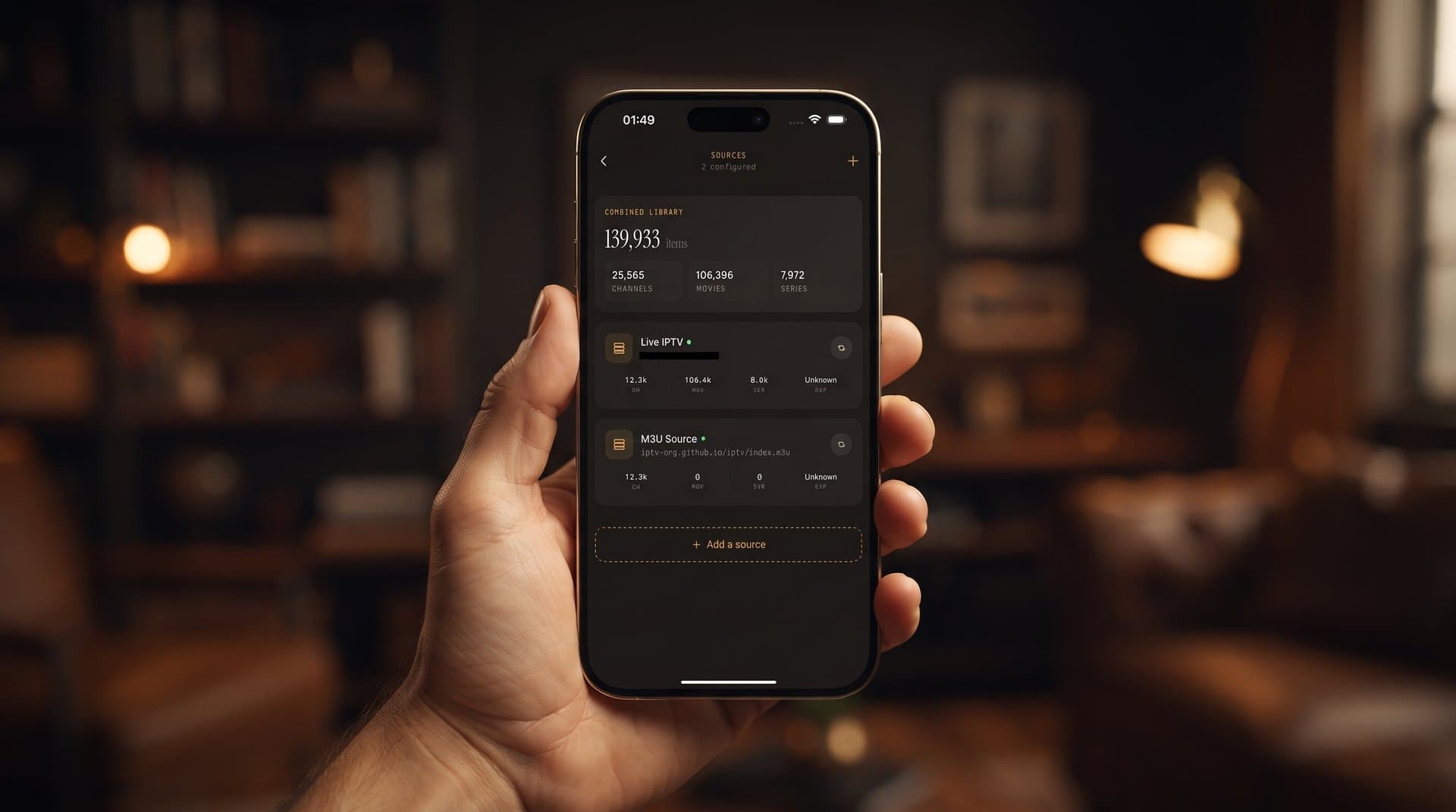
Maximus IPTV Player's Sources screen treats each of those as an entry in one list instead of a separate app. Open Sources and you'll see a Combined Library stat at the top — a live count of everything currently merged — followed by each connected source underneath it, labeled by type ("Live IPTV" or "M3U Source"), with an "Add a source" button to bring in the next one. Add a fourth provider next month and it slots into the same list; nothing about the rest of your library changes.

How do you add a source, step by step?
Maximus IPTV Player supports three ways to connect a source, and you can mix and match all three on the same account:
- Live IPTV (Stalker Portal) — a login-based connection using a portal URL, MAC address, or username/password combination supplied by your IPTV provider. This is the most common format for paid regional providers.
- M3U playlist — a plain-text playlist file (the
.m3uformat) containing a list of stream links and channel names. You add it by pasting the playlist URL your provider or your own server gave you. - M3U8 playlist — the modern variant of the M3U format, built for HLS-style adaptive streaming. It works the same way in Maximus: paste the URL, and the app parses it into channels automatically.
From the Sources screen, tap "Add a source," choose the type, and paste in your credentials or playlist URL. Maximus IPTV Player validates the connection, pulls in the channel and EPG data, and folds it straight into your Combined Library — you don't pick a source every time you want to watch something, the app just knows where each channel lives.
What happens to search, favorites, and the guide once you have multiple sources?
This is the part that actually saves time day to day. Once two or more sources are connected, every core feature in Maximus IPTV Player operates across all of them at once instead of one at a time:
- Universal search returns results from every connected source in one query — you're not manually switching sources to check whether a channel exists somewhere else.
- Favorites can pull channels from different sources into the same list, so your "most-watched" row on the Home screen doesn't care which provider a channel technically came from.
- The TV Guide (EPG) — the timeline grid showing what's airing now and later — merges programming data from every source into one scrollable guide, with a live "now" line running through it.
- Continue Watching and Resume Playback track your position the same way whether the title is on a Live IPTV channel or an M3U-sourced stream.
The practical effect is that Maximus IPTV Player stops feeling like "the app for provider X" and starts feeling like your personal command center for everything you're legally subscribed to.
Does adding more sources slow things down or affect picture quality?
No — each source streams independently once selected, so playback quality (up to 4K, where the source supports it) and buffering behavior depend entirely on that individual stream's bitrate and your connection, not on how many other sources you've added. Maximus IPTV Player doesn't transcode or bundle sources together at the video level; the Combined Library is an organizational layer on top, not a re-encoding step. Adding your fifth source doesn't make your first source buffer any differently than it did on day one.
Is multi-source support available on both iPhone and Android?
Yes. Multi-source streaming isn't a platform-exclusive feature — it works identically whether you're running Maximus IPTV Player on an iPhone, an iPad, an Android phone, or an Android tablet. Maximus IPTV Player is a genuinely cross-platform, every-screen app: on iOS it covers iPhone, iPad, and Apple TV through the Apple App Store; on Android it covers phones, tablets, and Android TV / Google TV through the same Google Play listing (package com.aegontech.maximus) — the identical multi-source Sources screen, Combined Library, and merged EPG travel with you across all six device types.
A quick note on what multi-source streaming is (and isn't)
Maximus IPTV Player is a player, not a content provider — it doesn't sell, bundle, or supply channels or streams of its own. Multi-source support exists to organize the legal subscriptions and playlists you already own, whether that's a paid regional Live IPTV package, a playlist from your own media server, or an M3U8 link your workplace or club provides for its own broadcasts. If you're evaluating IPTV providers to pair with the app, stick to services that are transparent about licensing. Maximus's job starts once you already have something legitimate to watch.
Frequently Asked Questions
Can I add more than one Live IPTV (Stalker Portal) login at the same time? Yes. You're not limited to a single Stalker Portal connection — add as many Live IPTV logins, M3U playlists, and M3U8 playlists as you need, in any combination, and they all appear in the same Combined Library.
Do I need to pick a source every time I want to watch something? No. Once your sources are added, Maximus IPTV Player's Home screen, search, and TV Guide pull from all of them automatically. You only interact with the Sources screen again when you want to add, in the future, another connection.
Will removing one source affect my favorites from the others? Removing a source only affects channels and titles that came from that specific connection. Favorites and history tied to your other sources stay intact.
Does multi-source support cost extra? Maximus IPTV Player is free to download, with an optional premium subscription for the app itself. Adding multiple sources is a feature of the app, not a paid add-on — though any individual Live IPTV provider you connect will have its own separate subscription terms.
Does this work the same way on Android TV or Apple TV as it does on a phone? The Sources screen and Combined Library concept are the same across the app; the TV builds present the same merged library through a native, remote-friendly interface rather than a stretched phone layout.
Getting started
If you're currently splitting your viewing across two or three separate IPTV apps because each one only talks to a single provider, that's exactly the friction Maximus IPTV Player's multi-source design is meant to remove. Add your existing Live IPTV login, M3U playlist, or M3U8 playlist, let the Combined Library merge them, and search, favorites, and the EPG start working across everything at once.
Maximus IPTV Player is free to download for iPhone, iPad, and Apple TV on the Apple App Store, and for Android phones, tablets, and Android TV / Google TV on Google Play.
Written by
Maximus IPTV Team