Watching International Channels on Maximus IPTV Player: A Guide for Expats, Travelers, and Global Viewers
If you grew up watching football on a channel from home, or you moved abroad and miss the news broadcasts your parents still watch every evening, you already know the specific frustration of "international TV" apps that promise everything and deliver a scrambled, buffering mess. Maximus IPTV Player was built to solve a narrower, more honest problem: once you already have a legal IPTV subscription or playlist, how do you actually organize, search, and watch channels from more than one country without the app turning into chaos? This guide walks through how Maximus IPTV Player's country-based organization, favorites, and casting tools work together for expats, dual-citizens, international students, and anyone whose viewing habits span more than one part of the globe.
To be clear up front: Maximus IPTV Player is a player, not a content provider. It doesn't sell channels, and it never will point you toward pirated or unlicensed streams. Everything below assumes you're bringing your own legal subscription or playlist — the app's job is to make that content easy to organize and watch, on your phone, tablet, or TV.
Key Takeaways
- Maximus IPTV Player groups Live TV channels by country, so a playlist mixing UK, Turkish, German, and Brazilian channels doesn't turn into one giant unsorted list.
- Favorites and Continue Watching keep your most-used international channels one tap away instead of buried in a scroll.
- The app is free to download on both the Apple App Store and Google Play, with an optional premium subscription — same core organization tools either way.
- Casting to a bigger screen works through AirPlay (Apple-only) or Chromecast / Google Cast (available on both the iOS and Android apps), so international content isn't stuck on a phone screen.
- 4K playback and buffer-free streaming apply the same way to an international M3U8 feed as they do to any other source — the country isn't the bottleneck, your source and connection are.
Why Does "International" Even Matter for an IPTV App?
Most IPTV setups don't come from a single, tidy provider. If you've lived in more than one country, or your family has, it's common to end up combining a couple of playlists: maybe one M3U source for UK channels, another for Turkish or German programming, plus whatever premium sports package you added later. M3U is a plain-text playlist format that lists stream URLs and channel names; M3U8 is the same idea but built around HLS (HTTP Live Streaming), the segmented streaming format most modern IPTV providers actually use under the hood. Some providers instead hand you Stalker Portal credentials — a login-based system rather than a playlist file. Maximus IPTV Player supports both M3U/M3U8 playlists and Stalker Portal sources, and you can combine more than one source into a single library.
The problem that creates: without any organization layer, a combined international playlist can easily run past a thousand channels once broadcast quality tiers and duplicate feeds are counted. Scrolling that on a phone is not a viewing experience, it's a chore. That's the gap Maximus IPTV Player's country grouping is built to close.
How Does Maximus IPTV Player Organize Channels by Country?
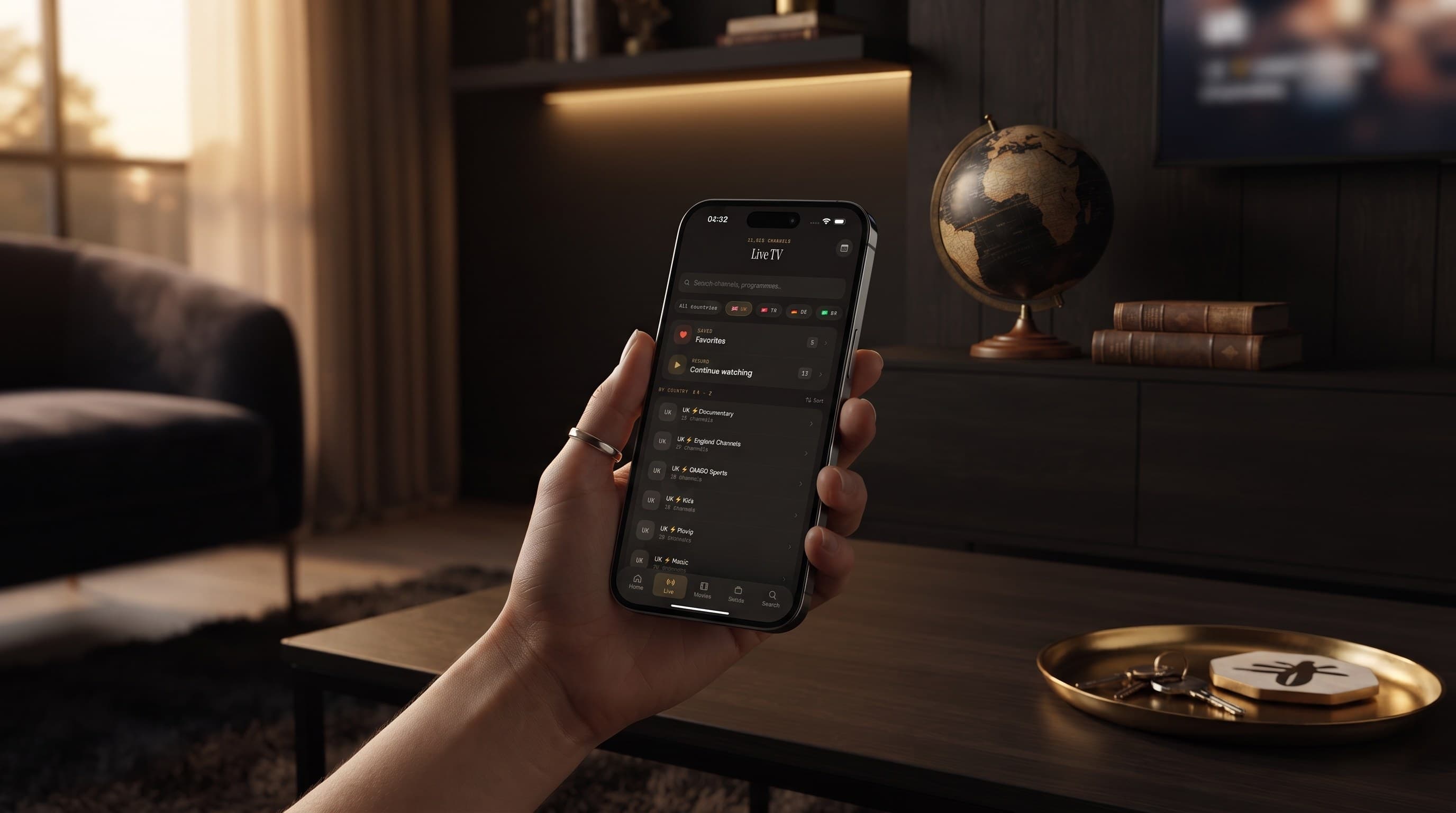
Open the Live TV tab and, instead of one undifferentiated list, you'll see country-based filters — the app's own screens show examples like UK, Turkey, Germany, and Brazil sitting right alongside Favorites and Continue Watching. If your combined playlist includes channels tagged for those regions (or others), Maximus IPTV Player groups them so you can jump straight to "everything from Turkey" or "everything from Germany" without wading through the rest. That grouping is driven by how your source labels its channels, so the cleaner your original playlist metadata, the cleaner the grouping — but the app does the sorting work for you rather than leaving you to build folders by hand.
Favorites sit on top of that grouping, not instead of it. Star the eight or ten channels you actually watch daily — a home-country news channel, a couple of sports feeds, whatever your household leans on — and they surface at the top regardless of which country group they came from. Continue Watching does something similar for shows and movies you've started but not finished, which matters more than it sounds like once you're juggling content in more than one language.

Can I Watch My Home Country's Channels While Traveling or Living Abroad?
This is the single most common reason people go looking for an app like this in the first place: you've relocated, or you're traveling for a few months, and you want the channels you grew up with without giving up whatever local or international content you've picked up since. As long as your playlist or Stalker Portal source is still valid on the network you're connecting from, Maximus IPTV Player will play it the same way it would at home — the app doesn't restrict playback by your device's location.
Two practical notes matter here. First, some providers geofence their own streams regardless of what player you use, so if a channel refuses to load abroad, that's typically a restriction on the provider's end, not something Maximus IPTV Player is doing. Second, on unfamiliar networks — hotel Wi-Fi, an airport lounge, a relative's router in another country — a VPN (a virtual private network that routes your connection through a server elsewhere, which some people use to reach a more consistent network path) can sometimes help with a flaky connection, but it's a networking decision separate from the app itself and won't change what your provider licenses you to watch.
What About Watching International Content on the Big Screen?
A phone screen is fine for checking scores between meetings, but a returning-home broadcast deserves a TV. Maximus IPTV Player supports casting through two different systems depending on your device: AirPlay, Apple's screen- and media-mirroring protocol, is available in the iOS app and works with Apple TV — but AirPlay is Apple-only, so it isn't part of the Android app. Chromecast (also called Google Cast) is the other option, and it's worth knowing this one isn't exclusive to Android — Maximus IPTV Player supports Chromecast on iOS as well as Android, so an iPhone user with a Chromecast-enabled TV isn't left out.

That casting flexibility matters specifically for international viewing, because a lot of households mixing content from more than one country also end up mixing devices — an iPad picked up while living in one country, an Android phone bought in another, a smart TV that came with whatever apartment you're renting now. Being able to cast the same combined library from either platform to either casting system means the country-of-origin of your hardware doesn't box you into one workflow.
Does 4K and Buffer-Free Playback Still Apply to International Feeds?
Yes — Maximus IPTV Player's playback engine doesn't treat an international M3U8 stream any differently from a domestic one. The app supports 4K playback and is built for buffer-free streaming when your source and connection can sustain it. In practice, the two things that actually determine picture quality for a channel from another country are the same two things that determine it for a local channel: the bitrate your provider is actually sending, and the stability of your own connection. An EPG (Electronic Program Guide) helps here too — it's the TV Guide-style timeline showing what's airing now and next across your channels, which is especially useful when you're not personally familiar with a foreign broadcaster's schedule.
Is Maximus IPTV Player Available on Both iPhone and Android for International Users?
Yes, and this matters for households where family members use different platforms. Maximus IPTV Player is free to download, with an optional premium subscription, on:
- Apple App Store — iPhone, iPad, and Apple TV.
- Google Play — Android phones, tablets, and Android TV / Google TV, all from the same app (package
com.aegontech.maximus).
That means a family split across an iPhone-using parent and an Android-using sibling, or a household that upgraded from one platform to the other, can both organize the same kind of international, multi-source library — country groupings, Favorites, Continue Watching, and parental controls all work the same way regardless of which store the app came from. Maximus IPTV Player also runs without ads or background tracking on either platform, which matters more, not less, once you're combining sources from multiple providers and don't want a third party quietly profiling that mix.
Frequently Asked Questions
Does Maximus IPTV Player provide the international channels itself? No. Maximus IPTV Player is a player app — it organizes, plays, and casts whatever legal M3U, M3U8, or Stalker Portal source you already have. It doesn't sell or bundle channel packages.
Can I combine a UK playlist and a Turkish or German playlist in one library? Yes. Maximus IPTV Player's multi-source management lets you add more than one M3U/M3U8 or Stalker Portal source, and the Live TV screen groups the combined result by country so the sources don't blur together.
Will my international channels show up in the EPG? If your provider supplies programming data for those channels, yes — the TV Guide timeline works the same way across every source in your combined library, not just one provider.
Does casting international content use more data than casting a local channel? No — casting sends the same stream your device is already playing to the TV; the country of origin doesn't change the bandwidth math. Buffer-free playback still depends on your provider's bitrate and your connection.
Is a VPN required to watch channels from another country? Not as a rule. If your provider already licenses you to watch a channel from wherever you're connecting, no VPN is needed. Some people use one for connection stability on unfamiliar networks, but that's a personal networking choice, not a Maximus IPTV Player requirement.
Bringing It All Together
International viewing shouldn't mean choosing between "everything is a mess" and "I gave up and only watch one country's content." Maximus IPTV Player's country-based Live TV grouping, Favorites, Continue Watching, and cross-platform casting (AirPlay on iOS, Chromecast on both iOS and Android) exist specifically so a combined, multi-country library stays usable instead of overwhelming — on a phone, a tablet, or the TV in your living room.
If that sounds like the setup you've been trying to build with folders and bookmarks, download Maximus IPTV Player free from the Apple App Store for iPhone, iPad, and Apple TV, or from Google Play for Android phones, tablets, and Android TV / Google TV, and bring your existing sources into one organized library.
Written by
Maximus IPTV Team