IPTV Channel Change Slow? Why Zapping Takes Seconds
Press a channel button on a cable box and the picture changes almost instantly. Press the same button in an IPTV app and you may stare at a spinner for three, five, sometimes ten seconds. If you've wondered whether something is broken, the short answer is usually no: slow channel changes are a normal side effect of how internet video works, and a few of the causes are within your control. This guide explains what happens in those seconds, which delays you can fix, and how to set up Maximus IPTV Player on Android TV or Google TV so that flipping channels feels as quick as it reasonably can.
Key Takeaways
- Channel changes on IPTV are slower than on cable because the player must fetch a playlist, download a few video segments and wait for a keyframe before it can show a picture.
- Typical live streams use segments of 2 to 10 seconds, so a few seconds of start-up delay is expected, not a fault.
- Most of the delay you can influence comes from your network (Wi-Fi vs Ethernet), the size of your channel list, and the provider's server, not the app.
- Browsing less and searching more, using Favorites, and keeping your list tidy all cut the number of slow zaps you make.
- Maximus IPTV Player is free to download, runs natively on Android TV and Google TV with a remote-first interface, and is also available on iPhone and iPad.
Why is changing channels on IPTV slower than on cable?
A cable or satellite box receives every channel as a constant broadcast stream. Tuning to a new channel means the box simply starts listening to a different stream that is already flowing to it, and the delay is usually well under a second.
IPTV works differently. Nothing is broadcast to your home until you ask for it. When you select a channel, your player sends a request to the provider's server, the server starts or locates that stream, and only then does video begin to travel to your device. Every step in that chain adds a little time, and the steps happen one after another.
Here is the typical sequence when you select a live channel:
- The request. Your player contacts the provider's server. If it hasn't talked to that server recently, the connection itself has to be set up first, including a DNS lookup (turning a server name into an address) and a secure TLS handshake. That alone can take a few hundred milliseconds on a good connection.
- The playlist. Most live IPTV uses HLS (HTTP Live Streaming), a format that chops video into small files called segments. The player first downloads a small text file listing those segments, called a manifest or M3U8 playlist.
- The first segments. The player downloads one or more segments. Segments typically last somewhere between 2 and 10 seconds each, and many players want a few of them buffered before they start, so that playback doesn't stutter.
- The keyframe. Video is compressed as a sequence of full pictures (keyframes) and small changes in between. A player cannot show a clean picture until it reaches a keyframe, which commonly arrive every 1 to 2 seconds, or even less often on some streams.
- Decoding. Finally the device's video decoder starts up, and the first frame appears on screen.
None of this is a defect. It is the price of delivering video over the open internet, where the same stream can reach any device, in any room, on any connection.
What actually makes some channels slower than others?
If a few channels feel instant and others crawl, that's a clue. The delay is rarely uniform, and these are the usual reasons it varies.
How long are the stream's segments?
A provider that serves 2-second segments lets your player start quickly. A provider that serves 10-second segments forces the player to download much more data before the first frame. The player can't change this; it's a setting on the provider's side. If one channel is consistently slower than its neighbours, the stream itself is probably configured that way.
Is the channel already running on the server?
Some providers only start a channel's stream when the first viewer asks for it, then keep it alive while people watch. The first person to open a quiet channel pays a start-up penalty, and the second person doesn't. That's why an obscure channel can feel slow in the morning and fine in the evening.
How heavy is the video format?
A 1080p stream using the H.264 codec (a common video compression standard) starts quickly on nearly any device. A 4K stream using HEVC (also called H.265, a newer and more efficient codec) carries more data per second and asks more of the decoder. 4K and HD / SD playback depend on the stream and your device, and the heavier the stream, the longer it generally takes to show the first picture.
Is the server far away or overloaded?
Distance matters, but load matters more. During a big football match, thousands of people open the same channel in the same minute, and the provider's servers take longer to answer each request. If channel changes are slow only during major live events, the bottleneck is almost certainly upstream of your home.
How much does your own network matter?
More than most people expect. Start-up speed is mostly about how quickly several small downloads complete in a row, so latency and stability matter as much as raw bandwidth.
- Ethernet beats Wi-Fi. A TV connected by cable usually has lower and steadier latency than the same TV on Wi-Fi. If your Android TV box or Google TV device has an Ethernet port, or you can add an adapter, it's the single most effective change for living-room viewing.
- 5 GHz beats 2.4 GHz. If you must use Wi-Fi, the 5 GHz band is generally faster and less crowded than 2.4 GHz, though it covers less distance through walls.
- Distance and walls hurt. A TV two rooms away from the router can lose half its usable speed. A mesh node or access point closer to the TV often helps more than a faster internet plan.
- A rule of thumb for speed. A single HD live stream commonly needs around 5 to 10 Mbps, and 4K needs considerably more, often 25 Mbps or above. If several people are streaming or downloading at once, your connection may be shared too thinly for quick starts.
A fast speed-test result tells you the pipe is wide, not that it's quick to respond. If your speed test looks great but channels still take a long time to start, test again from the TV's own location, with other devices busy, and compare.
Does a huge channel list slow things down?
It slows the browsing more than the playing. An IPTV subscription can contain thousands of channels, and scrolling through them with a remote is slow in any app. Each time you land on a channel and press select, you pay the start-up cost described above. If you zap through twenty channels hoping to find something, you've waited through twenty start-ups.
That is why the best way to change channels faster is often to change channels less. A few habits make a real difference:
- Use Favorites. Save the dozen or so channels you actually watch, so the one you want is a couple of remote clicks away instead of a hundred.
- Use Continue Watching. If you were halfway through something, jump straight back to it rather than browsing for it.
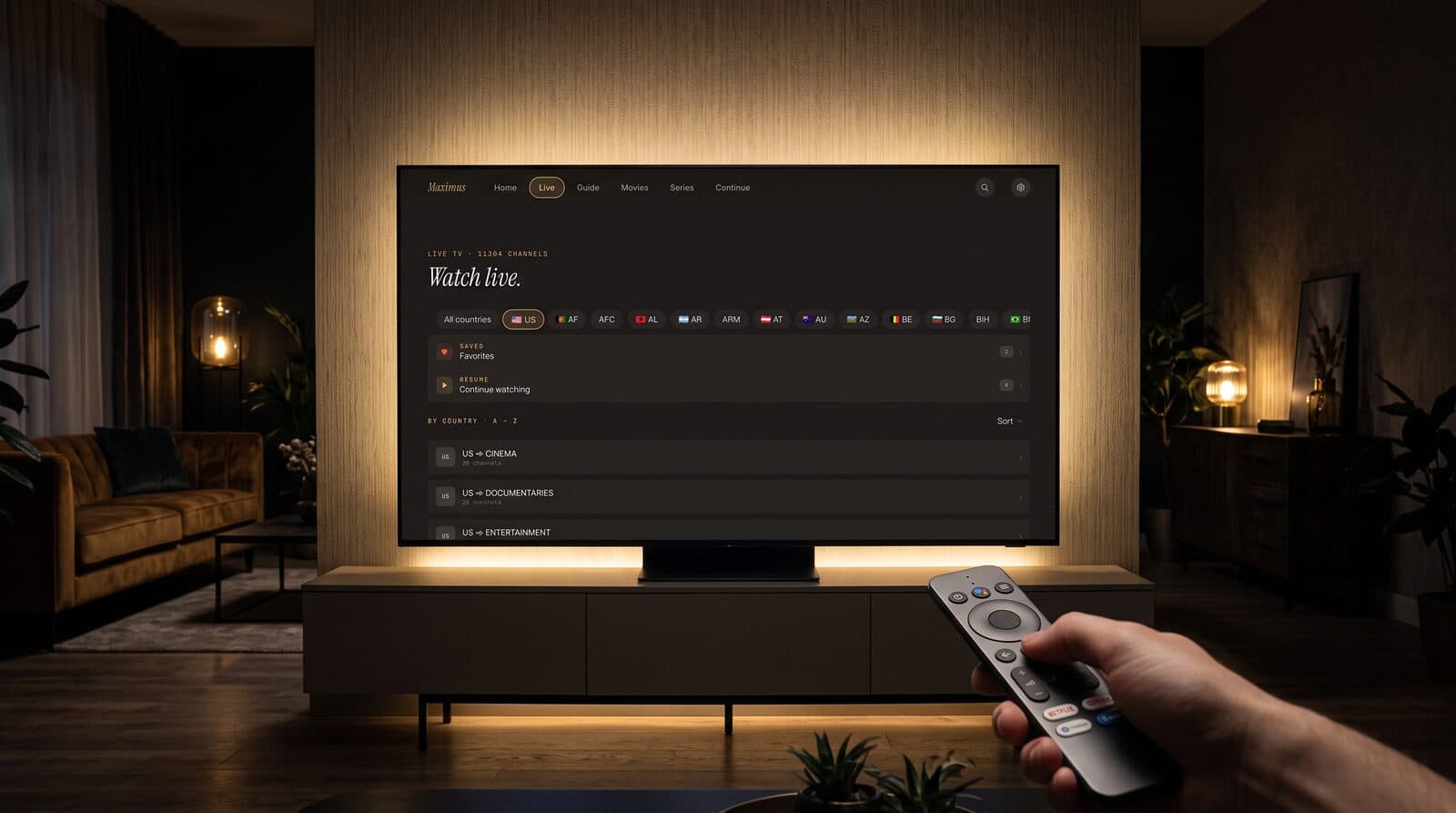
- Browse by country or group. Live TV in Maximus is grouped by country, so you can narrow thousands of channels down to a short list before you start scrolling.
- Search instead of scrolling. Universal search finds a channel, movie or series by name, which is much faster than paging through categories with a directional pad.
- Use the TV guide. The EPG (Electronic Program Guide, the timeline of what's on and when) shows what is playing on each channel, so you pick once instead of sampling.
How does Maximus IPTV Player handle this on Android TV and Google TV?
Maximus IPTV Player was built with a native TV interface designed for your remote, not a stretched phone app. The same Android app runs on phones, tablets and Android TV / Google TV, and the TV version is organised around the way you actually use a remote: a top bar with Home, Live, Guide, Movies, Series and Continue, and long lists that you move through with the directional pad.
A few things in that design help with slow channel changes in practice:
- Live TV grouped by country. A country strip across the top lets you jump to one region instead of paging through everything.
- Favorites and Continue Watching at the top. The two shortcuts sit above the country groups, so the channels you watch most are the first thing you reach.
- A real EPG timeline with filters. Sports, Movies, Kids and Favorites filters in the guide let you check what's on before you commit to a channel.
- Multiple sources in one library. You can combine sources, and your credentials stay on the device. Maximus has no ads and no tracking, so nothing extra is loading in the background.
Maximus is a player: the channels come from your own legal subscription or playlist, whether that's an Xtream Codes login or an M3U / M3U8 playlist. That means the speed of the underlying stream, the part that decides how many seconds the start-up takes, is set by your provider and your network. A good player can't make a slow server fast, but it can keep its own interface responsive and make it easy to reach the right channel without sampling a dozen wrong ones.
Quick fixes to try when channel changes feel slow
If zapping used to be quicker, or it's slow only on one device, work through this list in order. Each step takes a minute or two.
- Check whether it's one channel or all of them. One slow channel points to the provider's stream. All channels slow points to your network or device.
- Move the TV closer to the network. Try Ethernet, or test with the router a metre or two away to see whether Wi-Fi is the problem.
- Pause other traffic. Large downloads, cloud backups and game updates compete with your stream for the same connection.
- Restart the player and the router. It's a cliché because it works: it clears stale connections and cached DNS answers.
- Check the playlist for size and freshness. A source with tens of thousands of entries is slower to browse. If your provider offers a trimmed list, use it.
- Try the same channel at a quiet hour. If it's fast at 10 a.m. and slow on a match night, the cause is server load, not your setup.
- Compare against another device. If a phone on the same Wi-Fi starts the channel quickly and the TV doesn't, look at the TV's connection or storage rather than the stream.
- Update the app and the TV software. Decoder and networking improvements often arrive in system updates.
If none of this helps and every channel is slow on every device, contact your provider. Maximus can't speed up a stream the provider's server is slow to deliver.
Frequently asked questions
Why does the first channel take longer than the next ones?
The first channel has to set up the connection to the server (DNS lookup and a secure handshake). After that, the connection is often reused, so later channels from the same provider can start a little faster.
Is 5 seconds to change a channel normal?
On IPTV, a delay of 2 to 5 seconds is common, and longer isn't unusual on heavier streams. Under a second is rare, because the player needs a playlist, segments and a keyframe before it can show video.
Will a faster internet plan fix slow channel changes?
Sometimes, but not usually. Start-up depends on latency and stability as much as speed. A wired connection or a stronger Wi-Fi signal at the TV often improves things more than upgrading your plan.
Does a VPN make channels start more slowly?
It can. A VPN adds an extra hop and encryption, which raises latency. If you use one for privacy, test a channel with it on and off to see how much it costs you.
Is this a Maximus problem or a provider problem?
If the delay is on one channel or during busy hours, it's almost always the provider's stream. If other apps start the same channels faster on the same network, it's worth checking your device, connection and list size first.
Can I make channel changes faster by using Favorites?
Favorites don't shorten the start-up of a stream, but they cut the number of channels you have to open to find something, which is where most of the waiting really comes from.
Fewer zaps, less waiting
Slow channel changes are part of how IPTV works: a playlist, a few segments and a keyframe all have to arrive before a picture can appear. You can shorten that wait with a wired or stronger connection and by keeping your list manageable, and you can avoid most of it by choosing channels from Favorites, Continue Watching, search and the guide instead of flipping through them one at a time.
Maximus IPTV Player is free to download, and its Android TV and Google TV interface is built around exactly that kind of remote-first browsing. Get it from Google Play for Android phones, tablets and Android TV / Google TV, or from the Apple App Store for iPhone and iPad.
Written by
Maximus IPTV Team